SensorKit is an open-source control system for autonomous observatories, built for space domain awareness and time-domain astronomy. It connects your telescope hardware to an automation layer that decides — continuously and safely — when to open the dome, what to observe, and when to shut down, whether that's for a passing satellite, a transient follow-up, or an ordinary night of survey work.
You describe your site in a single YAML file: which mount, camera, and dome you have, what weather limits you trust, and which observing programs are allowed to request time. SensorKit runs the night.
sensors:
  - id: MySensor
    devices:
      mount: MyMount
      camera: MyCamera
      dome: MyDome

automation:
  controllers:
    MySensor:
      constraints:
        - kind: weather
          provider: MyWeather
          humidity_max: 85.0
          wind_max: 15.0
      tasking:
        - program: SatelliteSurvey
          priority: 5
What it does
- Autonomous operation. An agent service evaluates operating modes (e.g. sunset to sunrise), weather and safety constraints, and program schedules — then starts up, tasks, and shuts down each sensor on its own. A single command hands control back to a human.
- Speaks your hardware's language. Drivers for ASCOM Alpaca, PlaneWave PWI4, and Software Bisque TheSky are included, with additional modules for INDIGO, NINA, and the Observable Space Node Platform. If your device has one of these interfaces, SensorKit can probably run it today.
- Satellite tracking as a first-class citizen. Targets can be fixed alt/az or ICRS positions, TLEs, state vectors, or precomputed ephemerides. SensorKit propagates orbits (via
satkitandastropy) and drives mounts in rate-tracking modes for fast-moving objects. - Observing programs in a few dozen lines of Python. A program is a small class that advertises when it has work and produces the next task when asked. Everything else — scheduling, priorities, device sequencing, FITS writing — is handled for you.
- Configuration-defined data flow. Camera frames move through a pipeline you declare in YAML: inject FITS headers populated from live telescope state, compress, write to disk, or hand off to analysis services for astrometry, photometry, or focus estimation.
- Built to be pulled apart. Every device driver, sensor controller, program, and the agent itself is an independent service communicating over NATS JetStream. Services can run on different machines, restart without disturbing each other, and be swapped out without touching the rest of the system.
How it fits together
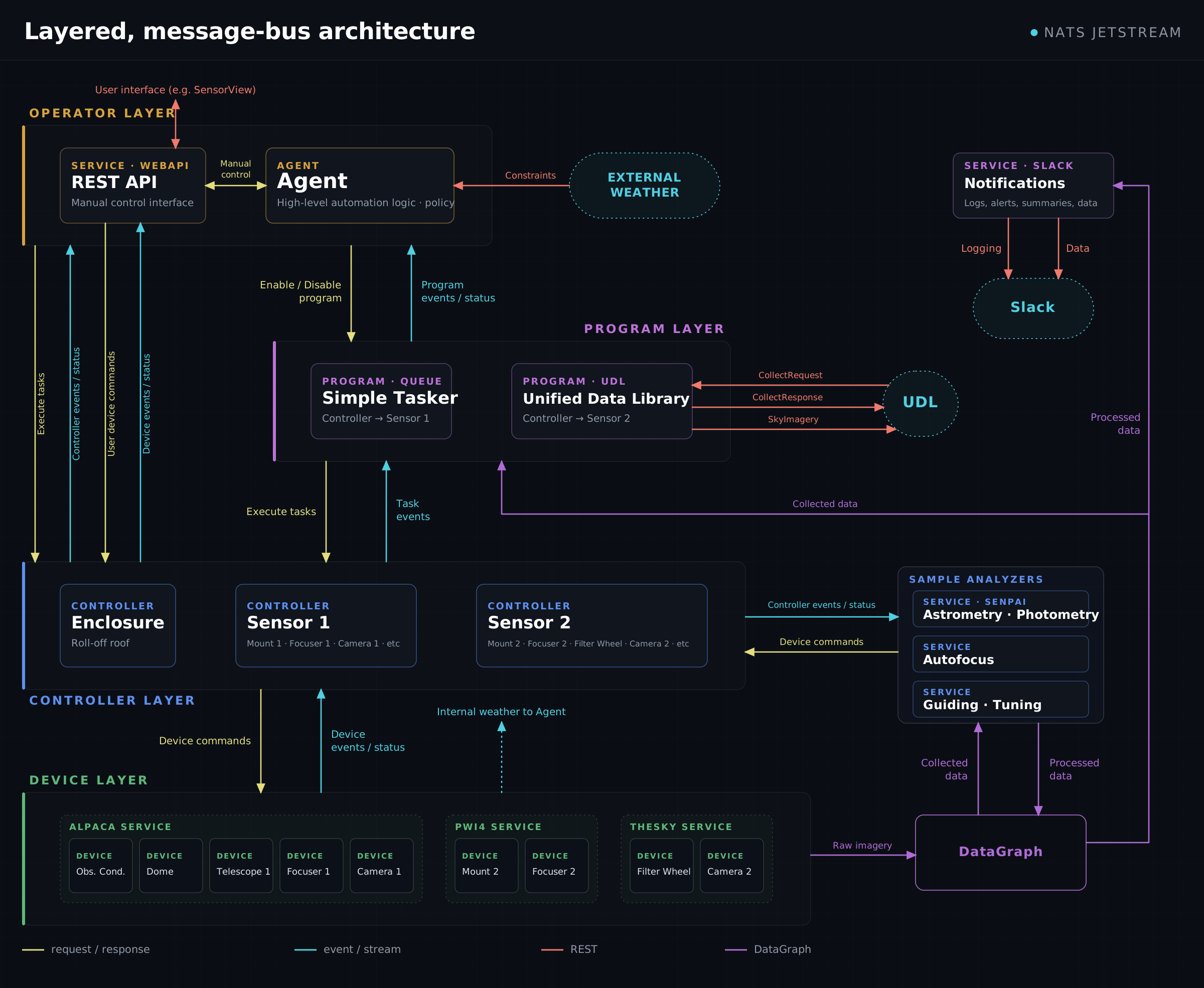
- Devices wrap hardware drivers and expose commands and telemetry on the bus.
- The sensor controller coordinates a mount, camera, dome, and friends into one logical instrument, with configurable init/shutdown sequencing and pointing-safety policies.
- Programs publish offer windows ("I have work between these times") and produce tasks on demand.
- The agent merges modes, offers, and constraints into a schedule, and brings controllers up and down accordingly. Its decisions are persisted, so a restart resumes exactly where it left off.
A few design choices worth knowing about, because they shape day-to-day use:
- Devices are described by what they can do, not what they're called. A structural trait system matches devices by the commands they implement, so a controller asks for "something that can slew and track" rather than a specific driver class.
- State is event-sourced. Controller and device state is rebuilt from a persisted event stream after a crash or restart — no "please re-home everything" after a network blip.
- Exclusive leases prevent two copies of the same service from fighting over one piece of hardware.
Status
SensorKit is in beta and under active development. It runs real telescopes nightly, but APIs and configuration formats are still evolving, and some corners are unfinished (module maturity varies — ASCOM Alpaca and PWI4 are the most exercised paths). Feedback and issues are very welcome.
Where to start
| Quick start | Run a complete simulated observatory with Docker in about ten minutes |
| Installation | Install SensorKit, start NATS, and launch services |
| Configuration | The unified sensorkit.yaml file, data flow, and the KV store |
| Device services | Connect ASCOM Alpaca, PWI4, TheSky, and Node Platform hardware |
| Sensor controller | Coordinate devices into an instrument; run tasks manually |
| Observing programs | Write a program that feeds targets to your telescope |
| The agent | Modes, constraints, scheduling, and autonomous control |
| CLI reference | Every sensorkit command |
| API reference | The sensorkit.api Python surface |